YOUR SOUND, VISUAL
AI music visualizer: good. A whole campaign: better.
Looking for a music visualizer to dress up your track? Good start — and exactly the kind of content TuneSprint generates for you. Except we don't stop there: we turn it into a full release.
TuneSprint builds your release from your track: one full video and 30 short ones, published on YouTube, Instagram and TikTok — one a day, the same one on all three networks. Paid once, per release.
Take my spot among the first 100−30% on your first release
REAL RENDER — AUTO EDIT, CUT ON THE BEAT
The short answer
- A music visualizer turns your track into moving image — waves, shapes, an animated cover reacting to the sound. It replaces the black square once your track is up.
- It holds people who are already listening — it does not go and find people who don't know you. That takes content with something to say: shots, a character, lyrics on screen.
- Two formats are needed, not one: **16:9** for the full track on YouTube, and **9:16** for the short videos that go out on YouTube, Instagram and TikTok.
What a visualizer actually does — and what it doesn't
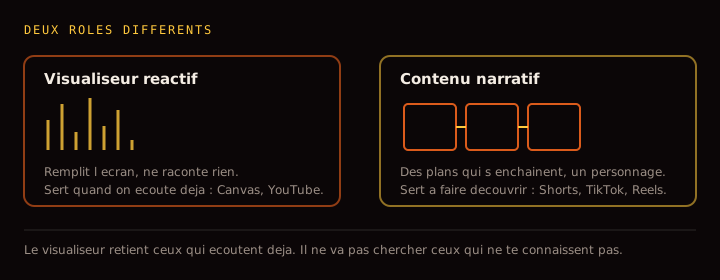
A visualizer turns your audio into moving image: a pulsing wave, shapes following the low end, a cover that breathes. On a video platform it replaces the frozen screen people scroll past. In a feed it gives the eye something to do while the ear listens.
But its limit deserves to be said plainly: a visualizer holds people who are already listening, it does not go and find people who don't know you. A moving waveform has nothing to say — it is elegant filler. Discovery needs shots that follow one another, a face, a story, lyrics on screen. That is the job of short vertical videos, not of a visualizer.
Both earn their place, at different moments. The visualizer dresses the listening. Narrative content brings people to it.
Two formats, three networks — one render won't do
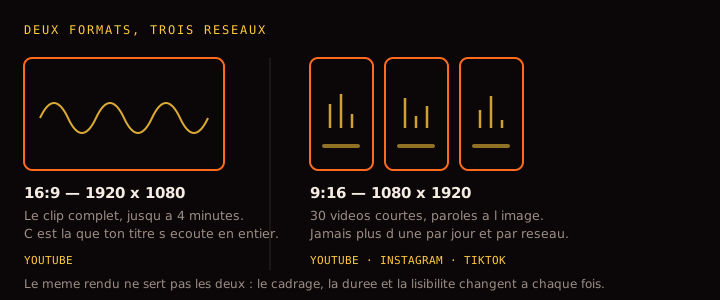
The common mistake is to build one visual and post it everywhere. But horizontal and vertical do different jobs. The 16:9 carries the full track: it is the format of the complete video, the one you watch once you have decided to listen. The 9:16 fills a phone screen inside a feed: it is the format of discovery, where everything is decided in the first second.
YouTube takes both — the full video in 16:9 and short videos in 9:16. Instagram and TikTok only take vertical. A horizontal render hastily cropped to vertical is spotted instantly: the subject ends up cut and the cutting rhythm no longer lands.
That is why your release holds one full video and 30 short ones, each produced in its own frame rather than one file sliced four ways. What goes where is detailed on the social video page.
No software, no timeline, no subscription
Building a visualizer by hand means learning an editor, tuning audio-reactivity parameters, exporting the right format for every network, and starting over on every release. Most artists give up on the second track — not for lack of talent, for lack of hours.
With TuneSprint you drop your track and lyrics, and the visuals come out in the right formats. You pay for your campaign once: one long video and 30 short ones, published across three networks at one a day, for one track. No subscription, no credits.
And nothing ships without your approval: you see every piece before it goes out.
What each format asks for
Production reference points. Useful orders of magnitude, not carved rules — platforms move their specs regularly.
→ swipe the table
| Format | Dimensions | Length | Where it goes | The trap |
|---|---|---|---|---|
| Full video 16:9 | 1920 × 1080 | up to 4 min | YouTube | The still frame: a frozen screen loses people in seconds |
| Short video 9:16 | 1080 × 1920 | 15 to 30 s | YouTube, Instagram, TikTok | No lyrics: many watch without sound on the first pass |
| Animated cover 1:1 | 1080 × 1080 | 5 to 15 s | free use | Text too small once shown as a thumbnail |
Vertical cannot be derived from horizontal by cropping: a subject composed for a wide frame ends up cut, and the cutting rhythm no longer matches.
Building a visualizer that holds up, step by step
Four decisions. The rest is execution.
Decide what the image follows
The low end, the vocal, or the overall tempo. A visualizer reacting to everything reacts to nothing: the image twitches constantly and the eye checks out. Pick one element of the record and let the image follow that.
Lock the format BEFORE producing
16:9 for the full video, 9:16 for the short ones. Deciding afterwards means cropping — and cropping means cutting the subject.
Make it readable without sound
Track title, artist name, lyrics if there are any. Someone landing on it muted should know what they're looking at within a second.
Leave the edges room
On vertical formats, interfaces cover the top and bottom of the screen. Everything that matters — face, text, logo — has to stay centred.
The mistakes that cost the most
Expecting a visualizer to drive discovery
It holds, it doesn't recruit. Without narrative content alongside, your release stays visible only to people already following you.
Cropping a horizontal render to vertical
The subject gets cut and the movement no longer lands where it should. Each format is produced in its own frame.
Forgetting the text
With no title and no artist name, a muted visualizer doesn't say which record it is. Someone connects, then has no way to find you.
Publishing everything on the same day
Thirty videos at once saturates your audience and blurs the signal. One a day, the same one on all three networks holds attention and shows what works.
AND IF YOU'D RATHER NOT DO IT BY HAND
Everything above is the work. TuneSprint does it for you.
You drop your finished track as MP3 or WAV, with your lyrics. We produce the full video and the 30 short ones, cut to your record, and publish them on YouTube, Instagram and TikTok — one a day, the same one on all three networks. You see every piece before it goes out.
How TuneSprint builds your visualizer
- 01
Your audio in
Your finished track as MP3 or WAV, plus your lyrics. The energy, the chorus and the mood get picked up.
- 02
Your visuals out
One full video in 16:9 and 30 short videos in 9:16, in your identity — not a stock template.
- 03
And it ships
On YouTube, Instagram and TikTok, never more than one short video a day, the same one on all three networks.
Real renders, not promises
Clips from real TuneSprint campaigns.
Doing it alone, a video maker, or a release studio
TuneSprint
- The videos
- The full spread, synced to your lyrics
- The plan
- Your release calendar, from tease to upkeep
- Publishing
- Automatic, right format, right time
- Measurement
- What hooks, across the whole campaign
- The model
- Paid once, per release
Clip generator
- The videos
- One file, then good luck
- The plan
- None
- Publishing
- Still you
- Measurement
- None
- The model
- Subscription + credits
All by yourself
- The videos
- Weeks of editing
- The plan
- Gut feeling
- Publishing
- Every post by hand
- Measurement
- Scattered stats
- The model
- Your free time
WHAT YOU GET
1 full music video + 30 shorts
- A music video up to 4 minutes, built from your track
- 30 shorts synced to your lyrics, posted on YouTube, TikTok and Instagram
- Never more than one video a day, the same one on all three networks — we grow your account instead of burning it
- Nothing goes out without your approval. One payment, no subscription.
Les 100 premiers — −30 %
€273€390
on your first order, whichever package
Take my spot among the first 100No card today — we are not open yet.
Also worth a look
FAQ
Which visualizer formats do you generate?
One full video in 16:9 up to 4 minutes, and 30 short videos in 9:16 synced to your lyrics. Each format is produced in its own frame rather than cropped from another.
What's the difference between a visualizer and a music video?
A visualizer reacts to sound: waves, shapes, a pulsing cover. It dresses the listening. A music video tells something: shots following one another, a character, a place. The visualizer holds people already listening, the video goes and finds people who don't know you. Both earn their place, at different moments.
Which networks does it go out on?
YouTube, Instagram and TikTok. The full 16:9 video goes to YouTube; the 30 short 9:16 videos spread across all three, never more than one a day, the same one on all three networks — we grow your accounts, we don't burn them.
Can I keep my visual identity?
Yes: colours, mood, signature elements. Your visual DNA is applied across the whole release so your feed stays coherent from one piece to the next.
What files do I upload?
Your finished track as MP3 or WAV, and your lyrics. That is all we need. Importing your own images and videos is not available today.
How is it generated?
Through AI video generation, driven by the analysis of your track: tempo, structure, chorus, mood. We say so plainly rather than let you assume a shoot. And you approve every piece before it goes out.
Who owns the videos?
You do, entirely. The music video, the shorts, the visuals: you own them and you can use them commercially, on any platform, without paying us anything afterwards. We take no rights on your music, no percentage of your revenue, and we claim nothing on what the engine builds from your track. TuneSprint is a tool you pay for once, not a label.
Do I approve everything before it goes out?
Yes, and that part is not negotiable. Every piece waits for your approval before it is published. You can remove one, ask for another render, or rewrite a caption. Nothing is posted to your accounts before you have seen it and said yes — not the music video, not a single short.
Is my music used to train an AI?
No. Your audio file does one thing: it lets us analyse your track — tempo, structure, hook, lyrics — to build YOUR release. It feeds no model training, it is not resold, it is not shared. You can ask for it to be deleted whenever you want.
Am I allowed to monetise a video made from an AI track?
That depends on the tool you made the music with and the plan you were on. With Suno for example, the terms differ between the free and the paid tiers — check yours before you publish. On the platform side: YouTube may apply Content ID if your track resembles a registered work, and asks you to disclose AI-generated content; Spotify and the others follow similar rules. We publish what you have the right to publish — the video side is yours without reservation.
Stop posting black squares
We're opening in small groups to keep quality high. Leave your email: you get in first — and you'll see your campaign plan before paying anything.
Take my spot among the first 100−30% on your first release