YOUTUBE SHORTS
YouTube Shorts that get your music discovered
YouTube Shorts is the one place where a clip of your track can reach people who have never heard of you while staying attached to your artist channel. Here is the exact format, the rhythm to hold, and what makes a music Short land instead of disappear.
TuneSprint builds your release from your track: one full video and 30 short ones, published on YouTube, Instagram and TikTok — one a day, the same one on all three networks. Paid once, per release.
Take my spot among the first 100−30% on your first release
REAL RENDER — AUTO EDIT, CUT ON THE BEAT
The short answer
- A Short is vertical 9:16, ideally 1080 × 1920, and can run up to 3 minutes — but the music Shorts that work usually sit between 15 and 40 seconds.
- Everything is decided in the first second: without movement or an immediate hook, the viewer scrolls before your chorus ever arrives.
- A Short stays attached to your channel: unlike a standalone post, it builds an audience you keep, and a distributed track can be identified by Content ID.
What a music Short has to do in three seconds
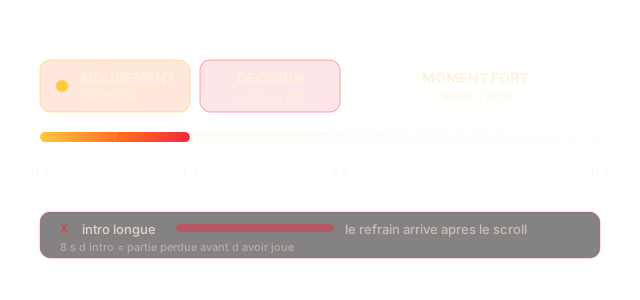
A Short has no thumbnail to click: it starts on its own inside a vertical feed. The viewer does not choose to watch it, they choose not to scroll past. That is a difference in kind from a regular YouTube video, and it changes everything that follows.
In practice you need movement on the very first frame, a visual hook before the brain has decided, and the track reaching its strong moment early. Opening with an eight-second intro is losing the game before playing it.
It is also why a cropped clip from a long music video rarely works: the editing rhythm of a music video is built for a seated listen, not for a decision made in one second.
Why Shorts and TikTok are not filled the same way
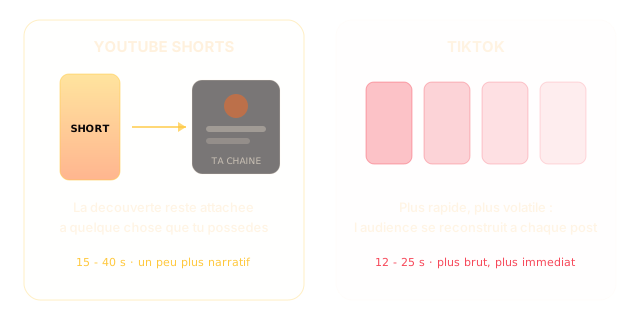
Both are vertical, both are feeds — and yet you do not post the same thing. On YouTube the Short stays tied to your channel: someone who likes it can go find your full music video, your other tracks, subscribe. Discovery is connected to something you own.
On TikTok discovery is faster but more volatile: the link to your account is weaker, and the audience rebuilds itself with every post. Both are worth it, but the same file does not play the same role — which is why you do not post the same edit on TikTok.
Practically: on Shorts you can afford slightly longer and slightly more narrative. On TikTok you have to be rawer and more immediate.
Content ID and AI disclosure: what to know before you post
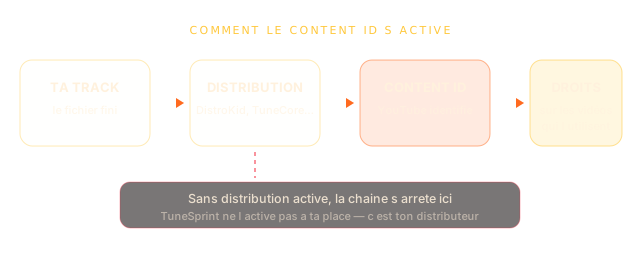
If your track is distributed — DistroKid, TuneCore, a label — YouTube can identify it automatically through Content ID in videos that use it, including other creators' videos. It is a useful mechanism, but not a magic one: it assumes your distribution is live and your metadata clean. The official documentation lives on YouTube Help.
Second point, often forgotten: YouTube asks you to disclose content that looks real but was generated or altered digitally. A clearly stylised video raises no question; a scene that could pass for real footage does.
Finally, if your music was made with an AI tool, check that tool's terms before monetising: they are usually not the same on a free tier and a paid one.
The specs, platform by platform
The same track is not posted in the same shape everywhere. Here is what each platform expects, so you avoid rushed crops and black bars.
→ swipe the table
| Platform | Format | Useful length | What else it wants |
|---|---|---|---|
| YouTube Shorts | 9:16 · 1080 × 1920 | 15 to 40 s (max 3 min) | Immediate movement, top and bottom margins left clear |
| TikTok | 9:16 · 1080 × 1920 | 12 to 25 s | Raw hook on frame one, text readable on mute |
| Instagram Reels | 9:16 · 1080 × 1920 | 15 to 30 s | Top margin for the interface, bottom zone kept clear |
| Full YouTube video | 16:9 · 1920 × 1080 | length of the track | A story that holds from the first shot to the last |
These are production guidelines, not rules imposed by the platforms: they move, and what matters stays what people watch to the end.
Making a Short from your track, step by step
The method comes down to four decisions. The rest is execution.
Pick the moment, not the beginning
Find the strongest passage of the track — usually the chorus or the drop — and build the Short around it. You do not start at the beginning of a song, you start where it grabs.
Lock the picture to the sound
Cuts have to land on the strong beats. An edit that ignores the beat is felt immediately, even when you cannot say why.
Time the lyrics to the second
Most people watch on mute the first time. If your lyrics appear exactly when they are sung, you win over the ones who have not turned the sound on yet.
Leave the edges alone
Interfaces eat the top and bottom of the screen. Everything that matters — face, text, logo — has to stay in the centre.
The mistakes that cost the most
Cropping a 16:9 video to vertical
The subject ends up cut, the rhythm no longer matches, and it shows. A Short is thought vertical from the edit, not after.
Starting with the song's intro
The first seconds of a track are rarely the strongest. On a vertical feed, that is exactly where you lose people.
Posting everything at once
Ten Shorts on the same day saturates your audience and blurs the signal. One a day holds attention and leaves time to see what works.
Forgetting the sound
A muted short does not tell anyone which track it is. The music has to be on the video, otherwise discovery leads nowhere.
AND IF YOU'D RATHER NOT DO IT BY HAND
Everything above is the work. TuneSprint does it for you.
You drop your finished track as MP3 or WAV, with your lyrics. We produce the full video and the 30 short ones, cut to your record, and publish them on YouTube, Instagram and TikTok — one a day, the same one on all three networks. You see every piece before it goes out.
How TuneSprint feeds your channel
- 01
Your track
Drop your audio file. The engine finds the hook, the peaks, and the moment the vocal carries most.
- 02
Your Short
Native vertical format, cuts on the beat, lyrics timed to the second, interface zones left clear.
- 03
Your publishing
The Short goes out on your channel in the right format, alongside your 30 shorts — never more than one a day, the same one on all three networks.
Real renders, not promises
Clips from real TuneSprint campaigns.
Doing it alone, a video maker, or a release studio
TuneSprint
- The videos
- The full spread, synced to your lyrics
- The plan
- Your release calendar, from tease to upkeep
- Publishing
- Automatic, right format, right time
- Measurement
- What hooks, across the whole campaign
- The model
- Paid once, per release
Clip generator
- The videos
- One file, then good luck
- The plan
- None
- Publishing
- Still you
- Measurement
- None
- The model
- Subscription + credits
All by yourself
- The videos
- Weeks of editing
- The plan
- Gut feeling
- Publishing
- Every post by hand
- Measurement
- Scattered stats
- The model
- Your free time
WHAT YOU GET
1 full music video + 30 shorts
- A music video up to 4 minutes, built from your track
- 30 shorts synced to your lyrics, posted on YouTube, TikTok and Instagram
- Never more than one video a day, the same one on all three networks — we grow your account instead of burning it
- Nothing goes out without your approval. One payment, no subscription.
Les 100 premiers — −30 %
€273€390
on your first order, whichever package
Take my spot among the first 100No card today — we are not open yet.
Go further
TikTok music videos
Videos built for TikTok — native vertical, instant hook, your track inside.
Song to video
Laying a song over footage or building a video from a song — two needs everyone confuses.
Music videos for social
What belongs on TikTok, YouTube and Instagram — and why it is not the same video.
FAQ
How long should a music Short be?
Technically up to three minutes. In practice, the music Shorts that hold attention usually sit between fifteen and forty seconds: enough to set a hook, reach the strong moment, and leave before attention drops. Longer is not forbidden, but the video then has to genuinely tell something.
Should my Shorts differ from my TikToks?
Yes, and not only to avoid repetition. On YouTube the Short is tied to your channel: someone who likes it can discover the rest of your work right after. So you can be slightly longer and slightly more narrative there. On TikTok you have to be rawer, more immediate. Same track, two edits.
Does Content ID work automatically?
Once your track is distributed through a service like DistroKid or TuneCore, YouTube can identify it in videos that use it, including other creators' videos. That assumes your distribution is active and your metadata correct. It is not something TuneSprint handles for you: your distributor switches it on.
Do I have to disclose that my video is AI-generated?
YouTube asks you to flag content that looks real while being generated or altered digitally. A clearly stylised video raises no issue; a scene that could pass for real footage does. When in doubt, disclose: disclosing does not hurt reach, failing to disclose can.
What file do I need to provide?
Your finished audio, MP3 or WAV. That is all. Video format, resolution, interface margins and framing are handled in production — you do not have to prepare anything vertical.
How many Shorts for one release?
Thirty, on the base package. They go out at one a day, the same one on all three networks, never more. That limit is deliberate: consistency is what builds an audience, not carpet bombing.
Who owns the videos?
You do, entirely. The music video, the shorts, the visuals: you own them and you can use them commercially, on any platform, without paying us anything afterwards. We take no rights on your music, no percentage of your revenue, and we claim nothing on what the engine builds from your track. TuneSprint is a tool you pay for once, not a label.
Do I approve everything before it goes out?
Yes, and that part is not negotiable. Every piece waits for your approval before it is published. You can remove one, ask for another render, or rewrite a caption. Nothing is posted to your accounts before you have seen it and said yes — not the music video, not a single short.
Is my music used to train an AI?
No. Your audio file does one thing: it lets us analyse your track — tempo, structure, hook, lyrics — to build YOUR release. It feeds no model training, it is not resold, it is not shared. You can ask for it to be deleted whenever you want.
Am I allowed to monetise a video made from an AI track?
That depends on the tool you made the music with and the plan you were on. With Suno for example, the terms differ between the free and the paid tiers — check yours before you publish. On the platform side: YouTube may apply Content ID if your track resembles a registered work, and asks you to disclose AI-generated content; Spotify and the others follow similar rules. We publish what you have the right to publish — the video side is yours without reservation.
Your music deserves to be found, not guessed at.
We're opening in small groups to keep quality high. Leave your email: you get in first — and you'll see your campaign plan before paying anything.
Take my spot among the first 100−30% on your first release